Opal vs Freedom: which blocker fits your Mac? (2026)
Opal vs Freedom compared for Mac in 2026: price, platforms, app and website blocking, scheduling, how hard each is to bypass, with a Mac-only third option.
Quick answer
In Opal vs Freedom, choose Freedom if you want one blocklist across Mac, Windows, iPhone and Android, with a $99.50 Forever plan as the one-time option. Choose Opal if your phone is the main problem and you want its app-blocking rules, with a Mac app included in the same plan, at $99.99 a year or $399 once. If you only need to block distractions on a Mac, Nudge is a third option at $9.99 once, with sessions started from the menu bar.
How do these apps compare?
Decide between Opal and Freedom for blocking apps and websites on a Mac, and see when a Mac-only blocker is the cheaper fit.
| App | Best for | Price | Website |
|---|---|---|---|
 NudgeTop pick NudgeTop pick | Daily focus sessions on a Mac only | $9.99 once | Get Nudge |
 Opal Opal | Phone-first blocking with a Mac app | Free, Pro $99.99/yr | Visit |
 Freedom Freedom | One blocklist on every device | $8.99/mo or $99.50 lifetime (Oct deal) | Visit |
 SelfControl SelfControl | Free timed website blocks | Free | Visit |
 Cold Turkey Cold Turkey | Locked blocks on Mac and Windows | Free, Pro $45 once | Visit |
Which tool should you pick?
Best for phone and Mac together
Freedom
Blocks apps and websites on macOS, Windows, iOS and Android, with one account and a Forever plan at $99.50.
Best if your phone is the problem
Opal
Phone-first rules on iPhone and Android, with a Mac app. Free plan with one rule.
Best for daily Mac focus sessions
Nudge
Presets of blocked apps and websites, started from the menu bar. $9.99 once.
Best free hard block
SelfControl
Free and open source. Websites only.
The apps in detail
- $9.99 once
1. App and website sessions
Nudge
Best for: Daily focus sessions on a Mac only
- Choose it if
- Your work and your distractions are on one Mac and you want to pay $9.99 once.
- Skip it if
- You also need blocking on your phone: Nudge is a Mac app, so Freedom or Opal fits better.
- Free, Pro $99.99/yr
2. App and website blocking
Opal
Best for: Phone-first blocking with a Mac app
- Choose it if
- Your phone is the main distraction and you want its rules on your Mac too.
- Skip it if
- You only work on a Mac and do not want a yearly plan or a $399 lifetime price.
- $8.99/mo or $99.50 lifetime (Oct deal)
3. Cross-device blocking
Freedom
Best for: One blocklist on every device
- Choose it if
- You want Mac, Windows, iPhone and Android in one account, with Locked Mode.
- Skip it if
- You only work on a Mac and prefer to pay once for less.
- Free
4. Website blocking
SelfControl
Best for: Free timed website blocks
- Choose it if
- You want a free block that stays on until the timer ends.
- Skip it if
- You need app blocking, schedules or presets.
- Free, Pro $45 once
5. Blocking
Cold Turkey
Best for: Locked blocks on Mac and Windows
- Choose it if
- You want a lockable block bought once.
- Skip it if
- You need phone blocking. Cold Turkey does not support iOS or Android.
What is the difference between Opal and Freedom?
Both block apps and websites and both have a Mac app. The difference is where each started. Opal began as a phone app and the Mac app is part of the same plan. Freedom is a cross-device service that treats Mac, Windows, iPhone and Android as equal platforms, with one blocklist synced between them.
So the first question is whether your distractions live on your phone, on your computer, or on both.
How do Opal and Freedom compare side by side?
Facts below come from each vendor's own site and were checked on 10 October 2026.
| Opal | Freedom | |
|---|---|---|
| Price model | Free plan with one rule. Pro: $99.99 a year (free week), $19.99 a month, or $399 once. | Free plan. Premium: $8.99 a month, $3.33 a month on the yearly plan (7-day trial), or $99.50 Forever. |
| Platforms | iOS, Android and Mac on the pricing page. The Mac app needs macOS 13 or later. | macOS, Windows, iOS, Android and Chromebook on the pricing page. |
| Website blocking | Yes, in supported browsers: Chrome, Safari, Opera, Edge, Brave and Arc on Mac. | Yes, on every platform listed. Website exceptions on Mac and Windows only. |
| App blocking | Yes. | Yes, on macOS, Windows, iOS and Android. Not on Chromebook. |
| Scheduling | Sessions (scheduled blocks), Open Limits and Time Limits. Free plan allows one rule. | Scheduling, recurring and advance sessions on Premium. |
| How hard to bypass | Hard Mode on Pro means you cannot turn Opal off. | Locked Mode prevents quitting a session. It is a Premium feature. |
| Sync across devices | Sessions and Screen Time do not sync in the Mac app, per Opal's help center. | Yes, unlimited devices on every plan. |
How much do Opal and Freedom cost?
Prices were checked on opalapp.com/pricing and freedom.to/pricing on 10 October 2026.
- Opal Free: $0, with one rule, basic timers and app blocking, on iOS, Android and Mac.
- Opal Pro: $99.99 a year (about $8.29 a month) with a free week, or $399 once for lifetime access. The monthly plan is $19.99. Students can apply for up to 50% off.
- Freedom Free: $0, with apps, websites and sync listed.
- Freedom Premium: $8.99 a month, or $3.33 a month on the yearly plan with a 7-day trial.
- Freedom Forever: $99.50 once with an October 2026 coupon, down from $199.
- Nudge: $9.99 once for Lifetime Access, after a 7-day free trial with no card.
Who should pick Opal, and who should pick Freedom?
Pick Opal if your phone is where the time goes and you want one app for both. Its Hard Mode, unlimited rules and advanced timers are in Pro, and the lifetime price is $399, so it is the more expensive way to cover a Mac alone.
Pick Freedom if you want the same blocklist on a Mac, a Windows PC, an iPhone and an Android phone, and want Locked Mode and recurring schedules. The Forever plan at $99.50 is the cheaper one-time route of the two.
How does each one work on a Mac specifically?
Opal's Mac app blocks the websites and apps you choose through three kinds of rule. Opal's help center says Dia, Comet and some other browsers are not supported yet, and the app must be open to track Screen Time. See Nudge vs Opal for a side-by-side with Nudge.
Freedom runs as a Mac app that blocks apps and websites, with website exceptions on Mac. Locked Mode stops you quitting a session. See Nudge vs Freedom for the comparison.
Neither is limited to the Mac, so some of what you pay for is for other platforms.
Which is harder to get around, Opal or Freedom?
Opal's answer is Hard Mode, a Pro feature: you cannot turn Opal off while a block runs. Freedom's answer is Locked Mode, a Premium feature that stops you quitting a session. Both close the easy exits; neither is a promise against someone determined to remove software from their own Mac.
Freedom adds another layer: because the same session runs on your phone and computer, picking up the other device does not help. Try the free versions first, then test the lock on your own Mac before you pay.
Is there a third option for Mac?
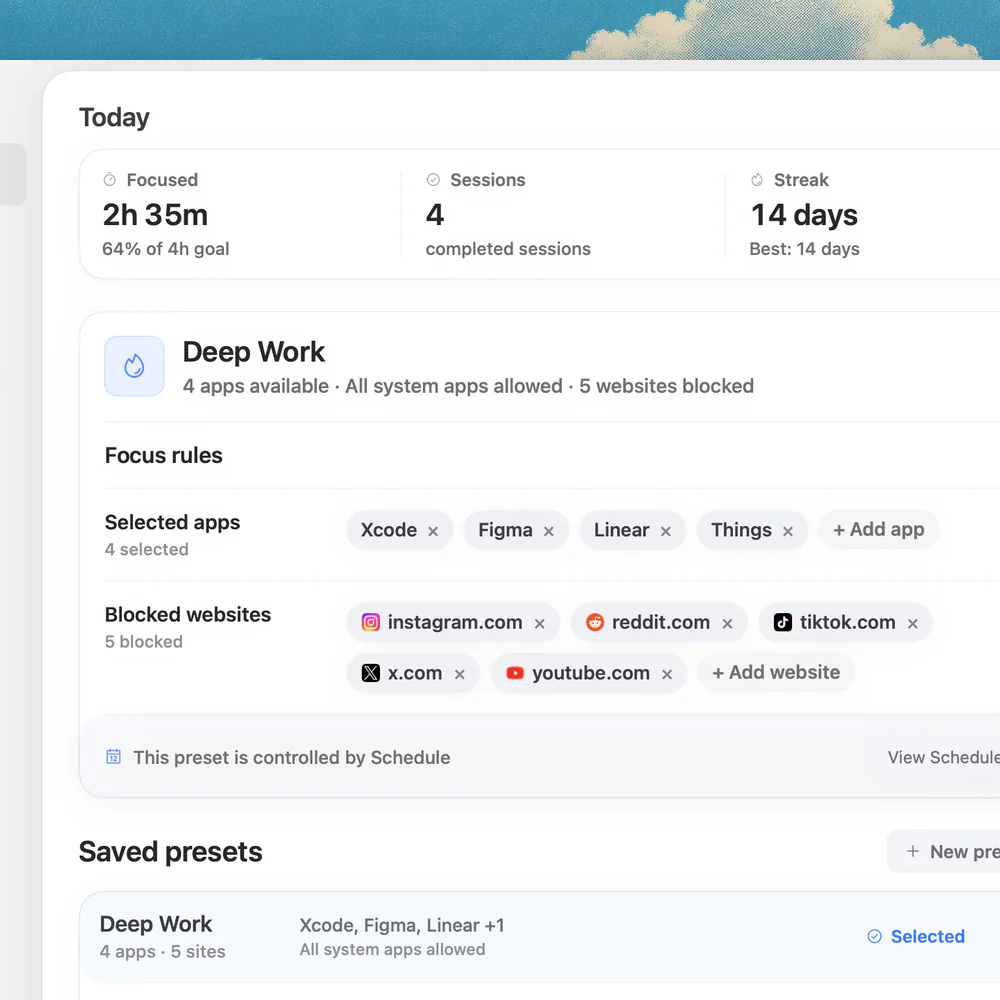
If you only need to protect focus on a Mac, Nudge is built for that. You pick the apps and websites that distract you, save them as a preset such as Deep Work, and start a session from the menu bar. Websites are blocked in Safari and Chrome. When the session ends, everything is reachable again.
A preset can also run on a schedule, with the days and hours you choose. Nudge costs $9.99 once for Lifetime Access, with no subscription, and every Mac gets a 7-day free trial with every feature, no email, password or card.
More options are in the Opal alternatives and Freedom alternatives lists. If you are choosing between other pairs, see Cold Turkey vs Freedom.
FAQ
Is Opal or Freedom better?
Neither wins for everyone. Freedom is better if you want one blocklist across Mac, Windows, iPhone and Android and a $99.50 one-time plan. Opal is better if your phone is the main problem and you want its rules on your Mac too.
Does Opal work on Mac?
Yes. Opal lists iOS, Android and Mac on its pricing page, and the Mac app needs macOS 13 or later. The free plan includes one rule.
Is Freedom cheaper than Opal?
For one-time and yearly plans, yes: Freedom Forever is $99.50 once against $399 for Opal lifetime, and Freedom Premium is $3.33 a month on the yearly plan against $99.99 a year for Opal Pro. Prices were checked on 10 October 2026.
Can I use Freedom or Opal for free?
Yes. Both have a free plan. Opal's free plan allows one rule. Freedom's free plan lists apps, websites and sync, but not scheduling or Locked Mode.
Is there a cheaper option than both on a Mac?
Nudge costs $9.99 once for Lifetime Access, after a 7-day free trial with no card. SelfControl is free for website blocks. Both are Mac-focused.
Which is harder to bypass, Opal or Freedom?
Opal has Hard Mode on Pro and Freedom has Locked Mode on Premium. Both make a started block harder to stop. Test the lock on your own Mac during the trial or on the free plan.
Nudge for Mac
Turn the guide into a focus session
Pick the apps and websites that pull you away and start the session from the menu bar. They stay blocked until it ends. $9.99 once after 7 days free, no card to start.
Download for macOS