Opal alternatives for Mac in 2026
Opal alternative for Mac: does Opal have a Mac app, is it free, and which 7 apps block websites and apps on a Mac for less. Prices checked October 2026.
Quick answer
Opal has a Mac app: it runs on macOS 13 or later and blocks the apps and websites you choose, and a free plan gives you one rule. The best Opal alternative for Mac is Nudge, which is built only for the Mac: you pick the apps and websites to block, start a session from the menu bar, and pay $9.99 once instead of $99.99 a year. Choose Opal or Freedom if your phone is the main problem, and Cold Turkey or Focus for a stricter Mac lock.
How do these apps compare?
Find out what Opal offers on a Mac and which Mac blocker fits if Opal's price or phone-first design is not what you need.
| App | Best for | Price | Website |
|---|---|---|---|
 NudgeTop pick NudgeTop pick | Mac focus sessions without a subscription | $9.99 once | Get Nudge |
 Freedom Freedom | Blocking across Mac and phone | $8.99/mo or $99.50 lifetime (Oct deal) | Visit |
 Cold Turkey Cold Turkey | Strict locked blocking | Free, Pro $45 once | Visit |
 Focus Focus | Mac blocking for a one-time price | From $29 once | Visit |
 1Focus 1Focus | Free Mac-only blocking | Free, Pro $9.99/yr | Visit |
 Session Session | Focus timer on Mac and iPhone, blocking on the Mac | Free, Pro $39.99/yr | Visit |
 Apple Screen Time Apple Screen Time | Built-in limits | Free, built into macOS | Visit |
Which tool should you pick?
Best Opal alternative for Mac
Nudge
Mac-only app and website blocking, presets and schedules. $9.99 once.

Best if your phone is the problem
Opal
Phone-first blocking on iPhone and Android, with a Mac app. Free plan, Pro from $99.99 a year.
Best for Mac and phone together
Freedom
One blocklist on Mac, Windows, iOS and Android. Lifetime access is $99.50.
Best strict one-time blocker
Focus
App and website blocking with a Locked Mode. One-time licenses from $29.
The apps in detail
- $9.99 once
1. App and website sessions
Nudge
Best for: Mac focus sessions without a subscription
- Choose it if
- Your work and distractions are on one Mac and you want to pay $9.99 once.
- Skip it if
- You need to block apps on your phone too: Nudge is a Mac app, so look at Freedom, Opal or Session.
- $8.99/mo or $99.50 lifetime (Oct deal)
2. Cross-device blocking
Freedom
Best for: Blocking across Mac and phone
- Choose it if
- You want one blocklist on Mac, Windows, iPhone and Android.
- Skip it if
- You only work on a Mac and prefer a small one-time price.
- Free, Pro $45 once
3. Blocking
Cold Turkey
Best for: Strict locked blocking
- Choose it if
- You want locked timers on Mac and Windows, with app blocking in the paid Pro version.
- Skip it if
- You need blocking on a phone. It does not support iOS or Android.
- From $29 once
4. Blocking and timer
Focus
Best for: Mac blocking for a one-time price
- Choose it if
- You want app and website blocking, schedules and a Locked Mode, bought once.
- Skip it if
- You want to start under $29.
- Free, Pro $9.99/yr
5. Blocking
1Focus
Best for: Free Mac-only blocking
- Choose it if
- You want a free blocker from the Mac App Store.
- Skip it if
- You need recurring scheduled blocks, which are a Pro feature.
- Free, Pro $39.99/yr
6. Timer and blocking
Session
Best for: Focus timer on Mac and iPhone, blocking on the Mac
- Choose it if
- You want timed sessions and stats, with blocking on the Mac and a companion iPhone app.
- Skip it if
- You want to pay once. Pro is $4.99 a month or $39.99 a year.
- Free, built into macOS
7. Usage limits
Apple Screen Time
Best for: Built-in limits
- Choose it if
- You want no extra app and basic schedules and daily limits.
- Skip it if
- You want blocks tied to work sessions. Screen Time can be switched off on your own Mac.
Does Opal have a Mac app?
Yes. Opal's site lists iPhone, Android and Mac, and the home page has a Download for Mac button. The Mac app needs macOS 13 or later and blocks and limits the websites and apps you choose.
It offers three kinds of rules: Sessions (scheduled blocks), Open Limits (a limited number of unlocks per day) and Time Limits (a block after a set amount of use). Supported browsers are Chrome, Safari, Opera, Edge, Brave and Arc. Opal's help center says Dia, Comet and some other browsers are not supported yet.
Is Opal for Mac free?
Partly. Opal's pricing page lists a free plan on iOS, Android and Mac with one rule, basic timers and app blocking. The help center says the free Mac plan gives you one scheduled Session or one Open Limit or Time Limit.
Unlimited rules, Hard Mode, Allow Only, advanced timers and Opal Score history need Pro. On the Mac, the strictest difficulty level ("No way, I'm hardcore") is a Pro feature, and it includes one Emergency Pass per week that ends all active blocks.
How much does Opal cost?
From Opal's pricing page, checked 10 October 2026: Pro is $99.99 a year, with a free week, or $399 once for lifetime access. The monthly plan is $19.99. Students can get up to 50% off, and Teams pricing is by contact.
Why do people look for an Opal alternative on Mac?
Opal started as a phone app and the Mac app is part of the same subscription. The usual reasons to look elsewhere are practical:
- The free plan allows one rule, so several kinds of work need Pro.
- Pro is $99.99 a year, or $399 once, for something you may only use on a Mac.
- Sessions and Screen Time do not sync across devices in the Mac app, according to Opal's help center.
- The Mac app must be open to track Screen Time, and it shows only the current day.
How much do Opal alternatives cost?
Prices below come from each vendor's own site and were checked on 10 October 2026.
- Opal: free plan. Pro is $19.99 a month, $99.99 a year or $399 once.
- Nudge: $9.99 once for Lifetime Access. 7 days free with every feature, no email or card to start.
- Freedom: free plan. Premium is $8.99 a month, $3.33 a month on the yearly plan, or $99.50 once.
- Cold Turkey: Blocker Free covers websites and timed blocks. Blocker Pro is $45 once.
- Focus: one-time licenses at $29, $49 and $129, with a 7-day trial.
- 1Focus: free to use. Pro is $1.99 a month or $9.99 a year in the Mac App Store, after a 14-day free trial.
- Session: free plan. Pro is $4.99 a month or $39.99 a year.
- Apple Screen Time: free, built into macOS.
Which Opal alternative is best for focus on a Mac?
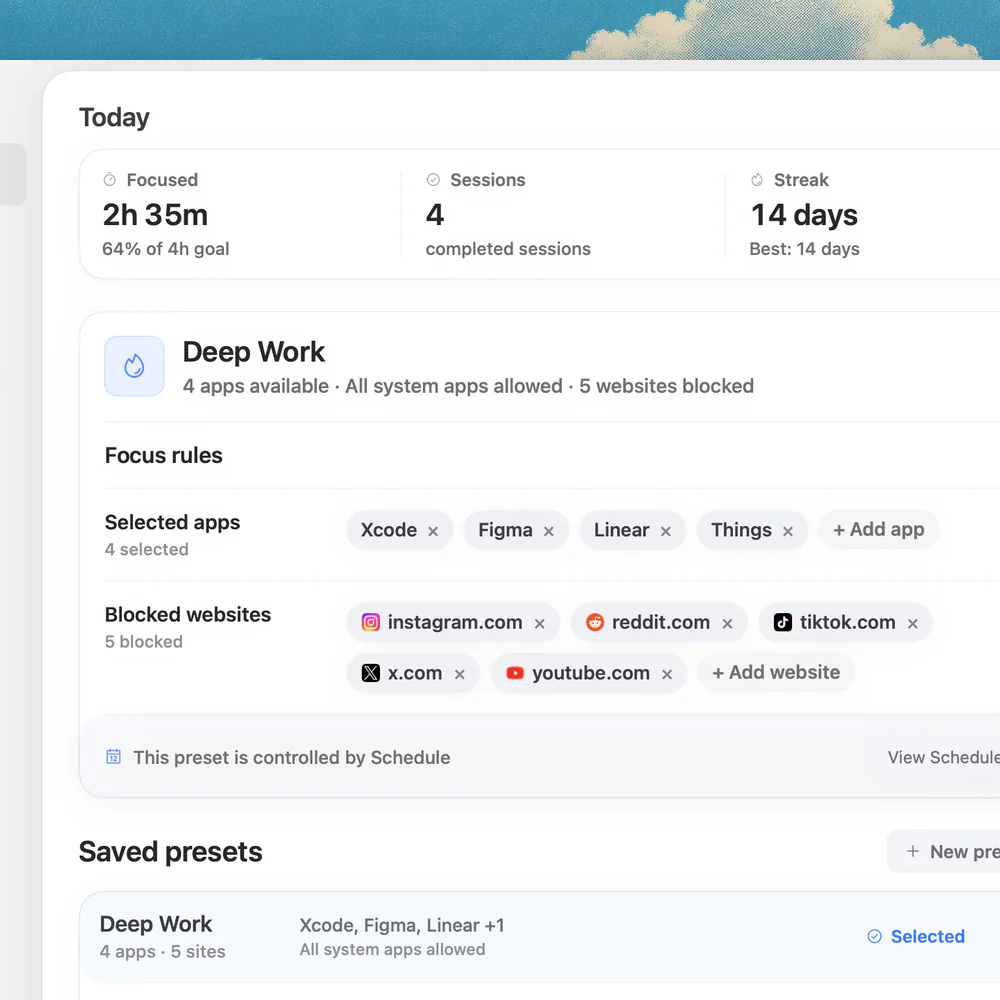
Nudge is built only for macOS. You save presets such as Deep Work, each with the apps and websites that stay blocked, and start one from the menu bar or put it on a schedule. Websites are blocked in Safari and Chrome, and everything is reachable again when the session ends. It costs $9.99 once, with no plan to renew. See Nudge vs Opal for a side-by-side.
For a stricter lock on a Mac, Cold Turkey alternatives and Focus are the next stop.
What if you need your phone covered too?
Then Opal is a reasonable choice, since it was built phone-first. Freedom covers Mac, Windows, iOS and Android with one blocklist, and Session pairs Mac blocking with an iPhone companion. See Freedom alternatives for how those compare.
A common setup is to use a phone-side tool for the phone and Nudge for the Mac.
FAQ
What is the best Opal alternative for Mac?
For Mac-only focus, Nudge: it blocks the apps and websites you choose during a session, with presets and schedules, for $9.99 once. For phone and Mac together, Freedom. For a strict lock, Cold Turkey or Focus.
Does Opal have a Mac app?
Yes. Opal lists a Mac app next to iPhone and Android, and its help center says it needs macOS 13 or later. It blocks the apps and websites you choose for each Session, Open Limit or Time Limit.
Is Opal for Mac free?
There is a free plan with one rule on Mac. Unlimited rules and the strictest difficulty level need Opal Pro, listed at $99.99 a year or $399 once on Opal's pricing page.
How do you download Opal for Mac?
Use the Download for Mac button on opalapp.com, then move the app to your Applications folder. Allow Opal to control your browsers under System Settings, Privacy & Security, Automation.
Is there a one-time-payment alternative to Opal?
Yes. Nudge costs $9.99 once, Focus sells one-time licenses from $29, and Cold Turkey Blocker Pro is $45 once. Opal itself has a $399 lifetime plan.
Is Nudge available on iPhone like Opal?
No. Nudge is a Mac app for macOS 13 or later on Apple silicon Macs. For the phone, look at Opal, Freedom or Session, and use Nudge for the Mac.
Nudge for Mac
Turn the guide into a focus session
Pick the apps and websites that pull you away and start the session from the menu bar. They stay blocked until it ends. $9.99 once after 7 days free, no card to start.
Download for macOS