
Cold Turkey alternatives for Mac in 2026
Compare Cold Turkey alternatives for Mac by free options, strict locks, app blocking, phone coverage and price.

Quick answer
The best Cold Turkey alternative for Mac depends on what you want to change. Nudge offers reusable app and website sessions for $9.99 once; SelfControl supplies a free, difficult-to-end website timer; Freedom covers phones as well as computers. Keep Cold Turkey Pro if lockable desktop blocks and schedules are your priority.
How do these apps compare?
Find a Mac blocker that fits when Cold Turkey feels too strict or more than you need.
| App | Best for | Price | Website |
|---|---|---|---|
 NudgeTop pick | Calm daily focus sessions on a Mac | $9.99 once | Get Nudge |
 SelfControl | Free hard website blocks | Free | Visit |
 Focus | Strict blocking for a one-time price | Focus 2 $49 once | Visit |
 Freedom | Blocking across Mac and phone | Free; Premium from $3.33/mo billed annually | Visit |
 1Focus | Low-cost Mac blocking | Free, Pro $9.99/yr | Visit |
 FocusMe | Detailed rules on many platforms | $9.95/mo billed annually or $449 lifetime | Visit |
 Apple Screen Time | Built-in limits | Free, built into macOS | Visit |
Which tool should you pick?
Best for Mac sessions
Nudge
Reusable app and website presets from the menu bar; $9.99 once.
Best free timed block
SelfControl
A website block that continues through restart until the timer ends.
Best for Mac and phone
Freedom
Synchronized desktop and mobile sessions; Premium adds scheduling and Locked Mode.
The apps in detail
- $9.99 once
1. App and website sessions
Nudge
Best for: Calm daily focus sessions on a Mac
- Choose it if
- You want chosen apps and sites blocked for a set session, for $9.99 once.
- Skip it if
- You want a multi-day lockdown rather than work sessions.
- Free
2. Website blocking
SelfControl
Best for: Free hard website blocks
- Choose it if
- You want a free timed block that stays on even after a restart.
- Skip it if
- You need app blocking, schedules or presets.
- Focus 2 $49 once
3. Blocking and timer
Focus
Best for: Strict blocking for a one-time price
- Choose it if
- You want Focus 2 website and app blocking with locked sessions, at $49 once; the older Focus 1 is $29.
- Skip it if
- You want the simplest possible setup.
- Free; Premium from $3.33/mo billed annually
4. Cross-device blocking
Freedom
Best for: Blocking across Mac and phone
- Choose it if
- The phone is part of the loop and you want one blocklist everywhere.
- Skip it if
- You only need a Mac-local session and do not need phone sync.
- Free, Pro $9.99/yr
5. Blocking
1Focus
Best for: Low-cost Mac blocking
- Choose it if
- You want a Mac-only blocker with a free tier and a $9.99 a year Pro plan.
- Skip it if
- You prefer to pay once.
- $9.95/mo billed annually or $449 lifetime
6. Blocking
FocusMe
Best for: Detailed rules on many platforms
- Choose it if
- You want deep rule-building across Windows, Mac and Linux.
- Skip it if
- You dislike configuration or a $449 lifetime price.
- Free, built into macOS
7. Usage limits
Apple Screen Time
Best for: Built-in limits
- Choose it if
- You want no extra app and basic daily limits.
- Skip it if
- You need blocks tied to work sessions. Screen Time is easy to switch off on your own Mac.
Pick the alternative by the missing feature
Comparison checked 1 November 2026 against vendor pricing and support documents. This is a documentation review, not a hands-on product test.
| Need | Option | Trade-off |
|---|---|---|
| Simple Mac sessions | Nudge | Selected apps and Safari/Chrome sites; no phone sync |
| Free timed website block | SelfControl | No app blocking or built-in schedules; timer cannot normally end early |
| Mac and phone | Freedom | Free up to two hours per session; Premium for schedules and Locked Mode |
| Detailed plans | FocusMe | More configuration; check platform-specific sync |
| Free built-in limits | Apple Screen Time | Daily limits rather than a dedicated lockable desktop session |
| Strict desktop blocking | Stay with Cold Turkey Pro or consider Focus | Check lock settings and recovery before a long block |
Do you need to leave Cold Turkey at all?
Cold Turkey Free already blocks websites for a set time. Pro adds app blocking, scheduled blocks and locking; read the Cold Turkey Free vs Pro guide before replacing it. If browser extensions and strict rules feel like more setup than you need, a shorter preset-based session may fit better.
Try an alternative without disrupting an active block
Suppose Cold Turkey blocks social media during a 9–11 a.m. writing window, but you want a simpler menu-bar preset. First check whether the active Cold Turkey block is locked and when it ends. Let it expire and review any recurring schedule before starting the replacement; do not stack two locked blockers on the same sites during a first test.
Save the same two distracting sites in the candidate app, keep your work and sign-in pages available, then run a short session and check each browser. If it covers the task and feels manageable, decide whether to keep the old schedule disabled. If you still need Cold Turkey’s Pro locks or Windows coverage, keeping it may be the better choice.
Set up a safer first block
Write down the apps and sites you want to limit, then identify the sites you need for work, authentication and urgent contact. Test a short timed block before enabling any hard lock. SelfControl remains active after a restart or deletion, so choose its duration with care.
Nudge saves selections in a preset and starts them from the menu bar, with scheduled presets available. Nudge runs on Apple silicon Macs with macOS 13 or later. Lifetime Access is $9.99 once, after a 7-day free trial with no card. For temporary setup see how to block websites temporarily on Mac.
Mac-only or phone too?
Freedom can synchronize sessions across devices. FocusMe says plans sync between Mac, Windows and iPhone with Premium, while its FAQ says Android sync is in development. Its pricing page describes sync more broadly, so verify Android support before buying. Cold Turkey supports Mac and Windows, not phones. If phone coverage decides the purchase, verify each device separately instead of assuming identical settings.
Compare Cold Turkey vs Freedom or Cold Turkey vs FocusMe for the detailed trade-offs.
FAQ
What is a free Cold Turkey alternative for Mac?
SelfControl is free and blocks selected internet resources for a timed period, including after restart. It does not block individual apps or provide a built-in schedule. Freedom has a free plan with sessions up to two hours.
Does Cold Turkey Free block apps?
No. Cold Turkey lists website blocking and timed blocks in Free; app blocking, scheduled blocks and locking features are in Blocker Pro.
Which alternative blocks websites and apps on a Mac?
Nudge blocks selected apps and sites during a Mac focus session. Freedom and FocusMe also list app and website blocking. Check the plan and supported browsers before choosing.
Which alternative also works on iPhone?
Freedom supports Mac and iPhone sessions. FocusMe has an iPhone app and says Premium syncs plans with Mac and Windows; Android sync is still in development. Cold Turkey does not support iOS.
How much does Nudge cost?
Nudge Lifetime Access costs $9.99 once after a 7-day free trial with no card. It supports Apple silicon Macs on macOS 13 or later and blocks selected sites in Safari and Chrome.
Nudge for Mac
Turn the guide into a focus session
Pick the apps and websites that pull you away and start the session from the menu bar. They stay blocked until it ends. $9.99 once after 7 days free, no card to start.
Download for macOS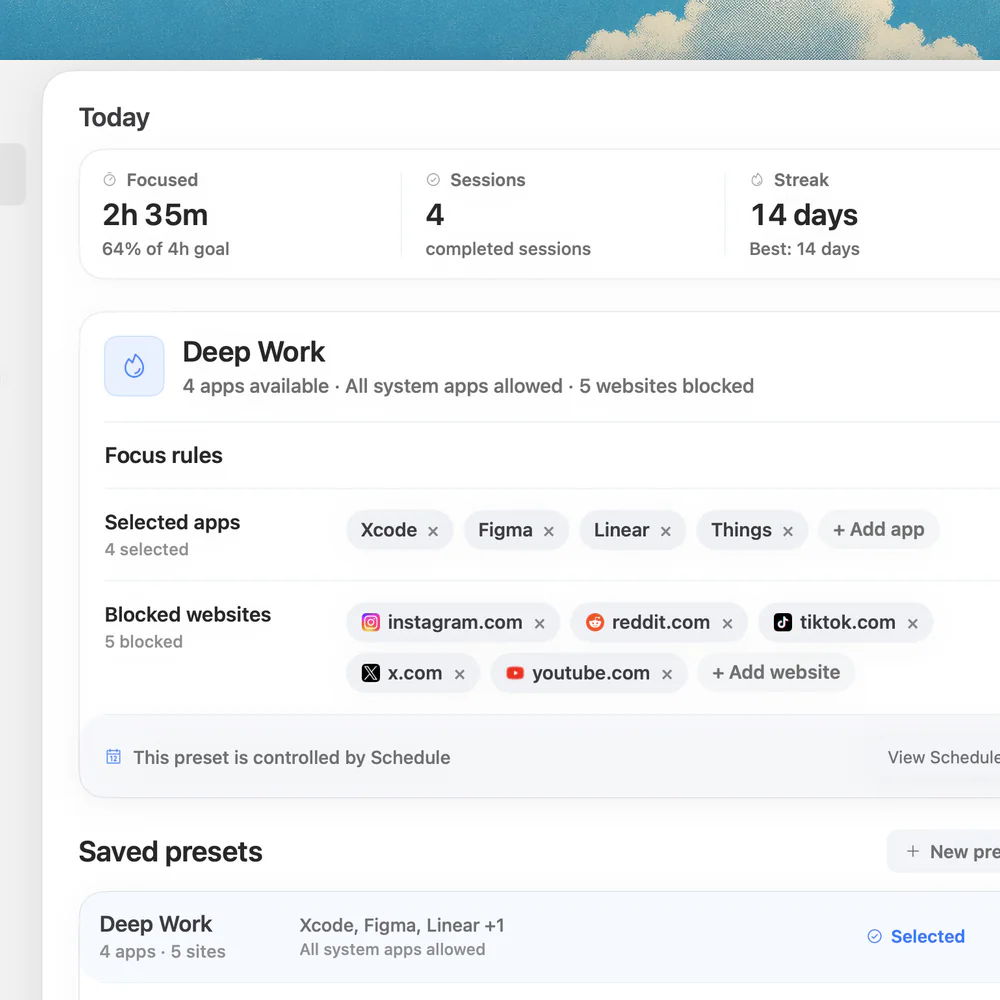
Sources
- Nudge: Mac focus sessions
- Cold Turkey: pricing and features
- Cold Turkey: browser and system requirements
- SelfControl: free timed blocking
- SelfControl: troubleshooting FAQ
- Freedom: Free and Premium plans
- FocusMe: features, platforms and sync
- Focus: pricing
- Apple: App Limits
- Cold Turkey: user guide and lock setup
Keep reading
 Website blockingCold Turkey Free vs Pro: what is included? (2026)
 Website blockingFocusMe alternatives for Mac: which should you choose? (2026)
 ComparisonNudge vs Cold Turkey
 Website blockingCold Turkey vs FocusMe: Mac blockers compared
 Website blockingFreedom alternatives for Mac in 2026: apps like Freedom, with no subscription
 Website blockingSelfControl alternatives for Mac in 2026
 Website blockingBest website blockers for Mac in 2026
 Blocking strategyApp blocker vs website blocker for Mac: which do you need?