How to use Pomodoro for studying
Build a study session around retrieval, practice questions, feedback, and breaks instead of just watching a timer.

Quick answer
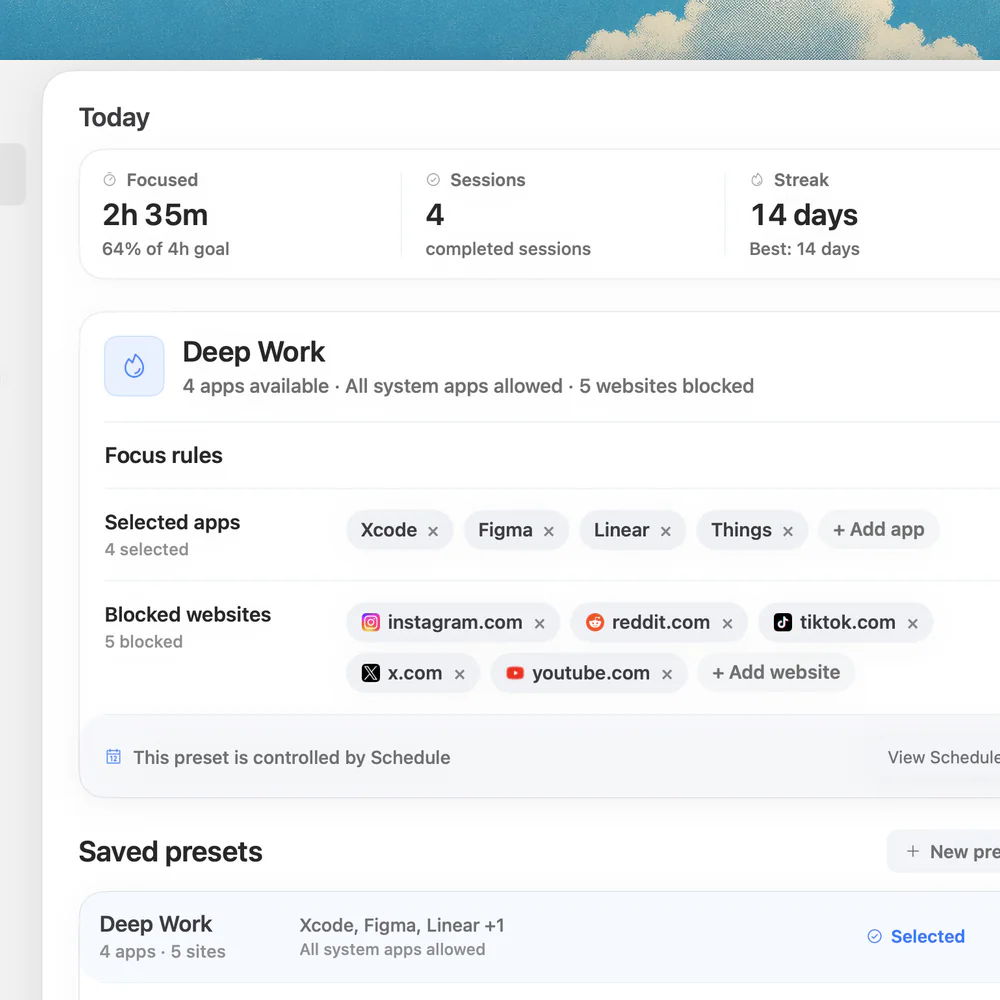
To use Pomodoro for studying, choose a small topic, work for a timed interval, and take a break before reviewing what you missed. Include recall or practice questions rather than only rereading. Nudge can block selected distractions on your Mac during a session; its 7-day trial requires no card.
How do these apps compare?
Plan study intervals that include recall, practice, feedback and a useful next step.
| App | Best for | Price | Website |
|---|---|---|---|
 NudgeTop pick | Blocking selected apps and sites during a work session | $9.99 once | Get Nudge |
| macOS Focus | Filtering notifications from people and apps | ||
 Pomofocus | Running a browser work and break timer | See pricing | Visit |
Which tool should you pick?
Protect a session
Nudge
Block selected apps and sites with a reusable Mac preset.
Filter alerts
macOS Focus
Allow important notifications while silencing others.
Time a session
Free focus timer
Choose a work interval and break in your browser.
The apps in detail
- $9.99 once
1. Session protection
Nudge
Best for: Blocking selected apps and sites during a work session
- Choose it if
- You want a reusable preset started from the menu bar.
- Skip it if
- You need to block a phone too.
2. Notifications
macOS Focus
Best for: Filtering notifications from people and apps
- Choose it if
- Alerts interrupt the work.
- Skip it if
- You need to restrict access to an app or site.
3. Timer
Pomofocus
Best for: Running a browser work and break timer
- Choose it if
- You want a browser timer.
- Skip it if
- You need app and website blocking.
What does a study Pomodoro actually include?
A timer provides a boundary; the study activity inside it matters. Choose a topic and an action you can finish or assess, such as explaining a concept from memory, solving a problem, or answering five questions. A short interval can make it easier to begin, but there is nothing magical about 25 minutes. Change the length if a different window fits the subject or your needs better.
Before starting, gather the relevant notes, assignment, questions and materials. Decide which resources are appropriate for the activity. A closed-notes recall attempt is useful for finding gaps; an open-book worked example can be useful when a concept is new. Both have a place, but they answer different questions.
How do you plan one study session?
Pick a narrow target, such as “explain the steps of cell division” or “solve two problems using the chain rule.” Write a question you will try to answer without looking. If you do not yet understand the material, first read a short explanation or work through an example, then close it and try to reconstruct the idea.
Set a timer for an interval that fits your schedule. When it ends, finish a sensible stopping point, record what you missed, and take a break. On return, check your answer against a reliable source or worked solution, correct the gaps, and choose what to practice next. A timer is a prompt, not a reason to ignore an urgent need or stop in the middle of a critical step.
Choose a small topic and a specific question or problem.
Gather the material and decide whether the first attempt is open or closed book.
Start an interval and retrieve, solve or explain actively.
Check your answer against notes or a reliable solution.
Record the gap and the next question, then take a break.
Return for another interval or schedule a later review.
Why use recall and practice questions?
Retrieval practice means bringing information to mind rather than looking at the answer immediately. Close the notes and explain a concept aloud, write the steps from memory, or answer a question. Then check accuracy: a confident but incorrect explanation needs correction just as much as a blank answer does.
In Roediger and Karpicke’s experiments, students recalled studied prose after a delay better following practice tests than repeated study. That finding supports trying retrieval, but it does not establish an ideal Pomodoro length or guarantee a result for every subject. Use the method as feedback on what needs more work, not as a score for judging yourself.
For unfamiliar material, a blank page may reveal that you need an initial explanation. Read a small section, put it away and try again. For procedural subjects, solve a fresh problem and compare each step with the worked answer. Ask a teacher or consult the course materials if the correction is unclear.
What does a study session look like in practice?
A student preparing for a biology exam might start with one process rather than the entire chapter. In the first interval, they read a short section and draw the process from memory. After a break, they compare the diagram with the course notes, mark missing steps, and answer two questions without looking.
A mathematics student might instead review one worked example, solve a similar problem independently, and compare the method line by line. A wrong answer is not wasted time: identify the first step that differs and practice that step again. The example below shows how the timer and the learning activity fit together.
| Interval | Action | Evidence to keep |
|---|---|---|
| First work interval | Learn a small topic and reconstruct it from memory | A sketch or short explanation |
| Break | Step away from the screen | A brief note of where to resume |
| Second work interval | Check, correct and answer practice questions | Errors and corrected reasoning |
| Later review | Try a fresh question without notes | What still needs practice |
How should you choose intervals and breaks?
Start with a work window that lets you complete a meaningful small action. The free study timer is one option, and the Pomodoro timer lets you use preset or custom durations. If a question needs more time, finish the thought or leave a clear note before stopping. If starting is difficult, make the first interval shorter.
A break can be as simple as standing up, getting water, looking away from the screen or changing activity. The UK HSE recommends breaks or changes of activity for screen work and notes that their timing depends on the work. You can resume sooner or take a longer pause as your circumstances require; do not treat a timer as a health prescription.
What if you keep rereading without remembering?
Turn the section heading into a question, close the page and write what you can remember. Reopen the source and mark what was missing or wrong. If you cannot answer at all, reduce the scope to one paragraph or concept, study it, then try again. The goal is to make the next gap visible.
Plan a later return to the material rather than repeating the same answer only within one sitting. A study of spaced vocabulary practice found that spacing affected learning; the best review schedule for your course depends on the material and your deadline. Put a realistic follow-up in your calendar and use a fresh question when you return.
How can you protect study time on a Mac?
Before starting, keep your course portal, notes, PDFs, calculator and other necessary resources available. Use macOS Focus to silence nonessential notifications while allowing the people or apps you need. Focus filters alerts; it does not restrict access to a distracting site.
Nudge can block selected apps and websites in Safari and Chrome during a session. Save a study preset and start it from the menu bar; adjust it if a course resource is blocked. Nudge requires an Apple silicon Mac with macOS 13 or later and does not block a phone. Its 7-day trial per Mac needs no card; Lifetime Access is $9.99 once.
What should you do after the session?
Write down the concepts you could explain, the questions you missed and the next action. For instance: “Review why the sign changes in step three; solve one new problem tomorrow.” Save the question and corrected solution where you can find them without rebuilding the session.
If the plan keeps slipping, reduce the outcome, check that you have enough background to start, or ask for help with a specific question. A timer cannot replace feedback from a teacher or a worked solution. The focus guide has more ideas for preparing a work session.
FAQ
Is 25 minutes the best study length?
It is a useful starting point, not a proven optimum for every learner or subject. Adjust the interval so you can make progress and take breaks when needed.
What should I do during a study interval?
Choose a small topic and retrieve, explain or solve something. Check your answer against reliable material and note the gaps to revisit.
Should I study with notes open or closed?
Use notes to learn or check a new idea, then try recalling or applying it without looking. Choose the format that matches the task and correct mistakes afterward.
What if I cannot answer a practice question?
Narrow the topic, review a short explanation or worked example, and try again. Ask your teacher for help if the correction remains unclear.
Can I use a Pomodoro timer for exam revision?
Yes. Use intervals to practice specific questions and review errors, then schedule later sessions for material that still needs work. The timer alone does not guarantee a result.
Nudge for Mac
Turn the guide into a focus session
Pick the apps and websites that pull you away and start the session from the menu bar. They stay blocked until it ends. $9.99 once after 7 days free, no card to start.
Download for macOS