SelfControl alternatives for Mac in 2026
SelfControl alternative for Mac: 7 apps compared on app blocking, schedules, ending a block early and price, checked on each vendor's site in October 2026.

Quick answer
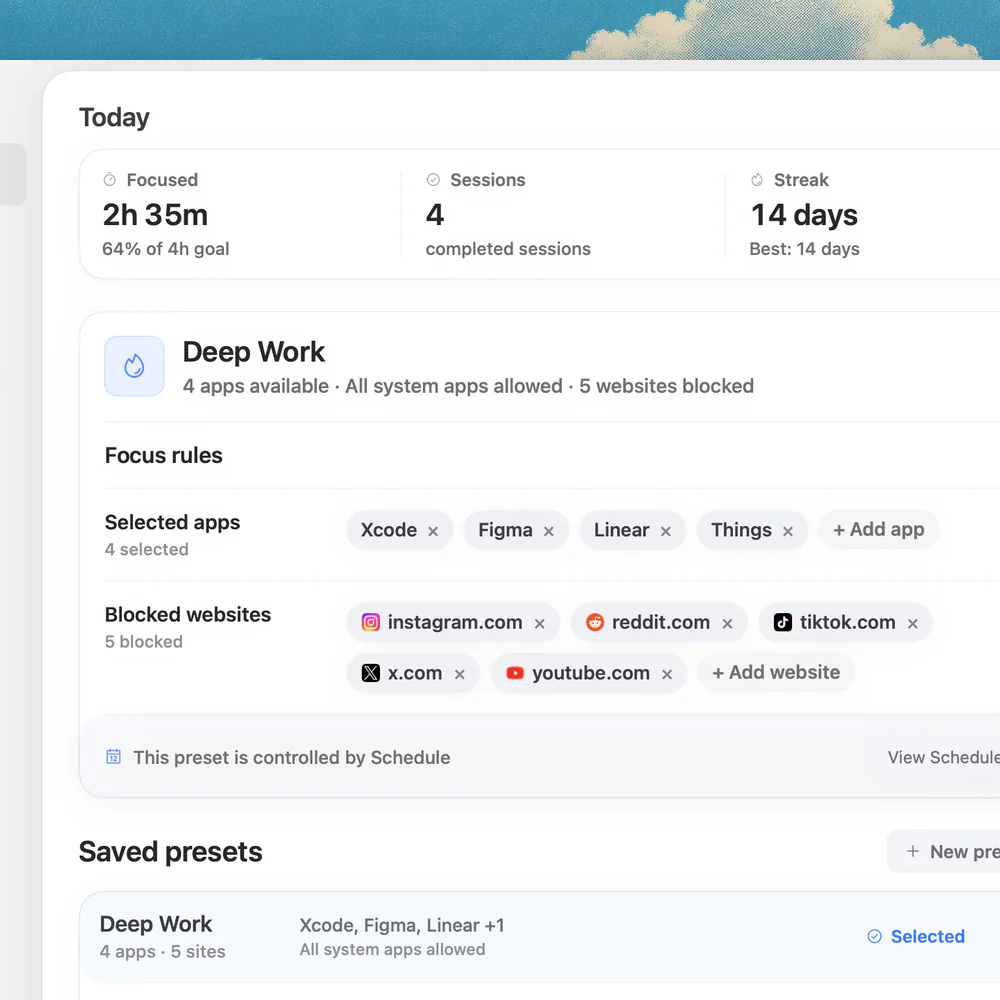
Nudge is the best SelfControl alternative for most Mac users: it blocks the apps and websites you choose during a focus session, starts from the menu bar, supports presets and schedules, and costs $9.99 once. Pick Cold Turkey or Focus for stricter locked blocking, Freedom if your phone is part of the problem, and 1Focus for a free Mac-only blocker. Keep SelfControl if you only need a free website block that nothing can end early.
How do these apps compare?
Find a Mac blocker that does what SelfControl does not: block apps, run on a schedule or keep presets.
| App | Best for | Price | Website |
|---|---|---|---|
 NudgeTop pick NudgeTop pick | App and website blocking in daily focus sessions | $9.99 once | Get Nudge |
 Cold Turkey Cold Turkey | Strict locked blocking | Free, Pro $45 once | Visit |
 Freedom Freedom | Blocking across Mac and phone | $8.99/mo or $99.50 lifetime (Oct deal) | Visit |
 Focus Focus | Strict Mac blocking for a one-time price | From $29 once | Visit |
 1Focus 1Focus | Free Mac-only blocking | Free, Pro $9.99/yr | Visit |
 Apple Screen Time Apple Screen Time | Built-in limits | Free, built into macOS | Visit |
 Session Session | Focus timer on Mac and iPhone, blocking on the Mac | Free, Pro $39.99/yr | Visit |
Which tool should you pick?
Best overall SelfControl alternative
Nudge
Blocks apps and websites during a session, with presets and schedules. $9.99 once.
Best strict alternative
Cold Turkey
Locked timers on Mac and Windows. Blocker Pro adds app blocking and schedules, paid once.
Best for blocking on Mac and phone
Freedom
Free plan, with Premium adding schedules and Locked Mode on Mac, Windows, iOS and Android.
Best free Mac-only alternative
1Focus
Free to use, blocks websites and apps, and is sold through the Mac App Store.
The apps in detail
- $9.99 once
1. App and website sessions
Nudge
Best for: App and website blocking in daily focus sessions
- Choose it if
- You want chosen apps and websites blocked for a set session, with presets and schedules, for $9.99 once.
- Skip it if
- You need to block the same things on your phone: Nudge is a Mac app, so look at Freedom, Opal or Session.
- Free, Pro $45 once
2. Blocking
Cold Turkey
Best for: Strict locked blocking
- Choose it if
- You want a locked timer on Mac and Windows, with app blocking and schedules in the paid Pro version.
- Skip it if
- You want quick daily work sessions rather than a locked timer.
- $8.99/mo or $99.50 lifetime (Oct deal)
3. Cross-device blocking
Freedom
Best for: Blocking across Mac and phone
- Choose it if
- The same blocklist should cover Mac, Windows, iPhone and Android.
- Skip it if
- You only work on a Mac and want to pay once for a small price.
- From $29 once
4. Blocking and timer
Focus
Best for: Strict Mac blocking for a one-time price
- Choose it if
- You want app and website blocking, schedules and a Locked Mode, with one-time licenses.
- Skip it if
- You want the lowest price. Licenses start at $29.
- Free, Pro $9.99/yr
5. Blocking
1Focus
Best for: Free Mac-only blocking
- Choose it if
- You want a free blocker from the Mac App Store that covers websites and apps.
- Skip it if
- You need recurring scheduled blocks, which are a Pro feature.
- Free, built into macOS
6. Usage limits
Apple Screen Time
Best for: Built-in limits
- Choose it if
- You want no extra app and basic schedules and daily limits.
- Skip it if
- You want blocks tied to work sessions. Screen Time can be switched off on your own Mac.
- Free, Pro $39.99/yr
7. Timer and blocking
Session
Best for: Focus timer on Mac and iPhone, blocking on the Mac
- Choose it if
- You want timed sessions and stats, with website and app blocking on the Mac.
- Skip it if
- You want to pay once. Pro is $4.99 a month or $39.99 a year.
What does SelfControl do?
SelfControl is a free, open-source Mac app. You add websites, mail servers or other internet resources to a blocklist, set a timer and start the block. Until the timer ends, you cannot reach those sites, even if you restart the Mac or delete the app. Its FAQ is direct about it: you cannot stop the block early.
That is the whole idea, and it is why many people keep it. The app is macOS only and licensed under the GPL.
Why do people look for a SelfControl alternative?
SelfControl does one job. The reasons people look elsewhere are a short list of things it is not built to do:
- It blocks internet access, not apps. Its documentation covers domains, mail servers and ports, not applications such as Slack or a game.
- It has no schedules of its own. The FAQ lists scheduling as a top feature request and points to third-party tools for recurring blocks.
- A block cannot be ended early, so a site you suddenly need for work stays blocked until the timer runs out.
- There are no presets, so you rebuild the blocklist for different kinds of work.
How much do SelfControl alternatives cost?
Prices below come from each vendor's own site and were checked on 10 October 2026.
- SelfControl: free and open source.
- Nudge: $9.99 once for Lifetime Access. 7 days free with every feature, no email or card to start.
- Cold Turkey: Blocker Free covers website blocking and timed blocks. Blocker Pro is $45 once. Students can request 20% off.
- Focus: one-time licenses at $29 (Focus 1), $49 (Focus 2) and $129 (Lifetime), with a 7-day trial.
- Freedom: free plan. Premium is $8.99 a month, $3.33 a month on the yearly plan, or $99.50 once for lifetime access.
- 1Focus: free to use. Pro is $1.99 a month or $9.99 a year in the Mac App Store, after a 14-day free trial.
- Session: free plan. Pro is $4.99 a month or $39.99 a year, and website and app blocking is a Pro feature.
- Apple Screen Time: free, built into macOS.
Which alternative blocks apps as well as websites?
Nudge, Cold Turkey Blocker Pro, Focus, Freedom, 1Focus and Session all block apps. Cold Turkey keeps app blocking in the paid Pro version, and Session limits blocking to Pro. Freedom's free plan lists app blocking too.
With Nudge you pick the apps and websites that distract you, save them as a preset such as Deep Work, and start the preset from the menu bar. Websites are blocked in Safari and Chrome. When the session ends, everything is reachable again. If you only use a Mac, see app blocker vs website blocker for why the app layer matters.
Which alternative locks you in like SelfControl?
Cold Turkey and Focus are the closest. Cold Turkey Pro includes all its locking features, and Focus has a Locked Mode that keeps a started session from being stopped. Freedom Premium adds Locked Mode as well. See Cold Turkey alternatives and Freedom alternatives for how those compare.
Nudge takes a different approach: daily work sessions instead of a lockdown. If you want a multi-day lock, SelfControl, Cold Turkey or Focus fit that job. If you want something you will start every morning, a preset and one click in the menu bar is easier to keep up. There is a side-by-side on the Nudge vs SelfControl page.
How do you choose?
Start with the question you are actually asking.
- I need app blocking and schedules on a Mac: Nudge, or Focus.
- I need the strictest lock: Cold Turkey or Focus.
- I need my phone covered too: Freedom, or Session for Mac plus iPhone.
- I need free and only websites: stay with SelfControl, or try 1Focus.
- I want no extra app: Apple Screen Time, with its limits.
Can Apple Screen Time replace SelfControl?
Partly. Screen Time on a Mac can limit apps and websites under System Settings, Screen Time: App Limits and Downtime on macOS 26 and earlier, Schedule and Time Allowances by app category on macOS 27. It is free and needs no install.
The limit is that you control the settings on your own Mac, so it is easy to switch off. SelfControl's block, by contrast, cannot be undone until the timer ends.
FAQ
What is the best SelfControl alternative for Mac?
For most Mac users, Nudge: it blocks the apps and websites you choose during a focus session, supports presets and schedules, and costs $9.99 once. For a stricter lock, Cold Turkey or Focus.
Does SelfControl block apps?
No. SelfControl blocks internet access: websites, mail servers and other internet resources. Its documentation does not describe blocking individual apps. Nudge, Focus, Cold Turkey Blocker Pro and 1Focus block apps.
Can you stop SelfControl early?
No. SelfControl's FAQ says a block cannot be stopped early, and it stays on after a restart or after deleting the app. That is its main strength and the main reason people look for alternatives.
Is there a free alternative to SelfControl?
1Focus is free to use and blocks websites and apps, with recurring scheduled blocks in Pro. Freedom and Cold Turkey Blocker have free plans with fewer features, and Apple Screen Time is free and built in.
Does SelfControl have schedules?
Not in the app. Its FAQ lists scheduling as a top feature request and points to third-party tools. Nudge, Focus, Freedom Premium and Cold Turkey Pro all have scheduled blocks.
How much does Nudge cost compared with SelfControl?
SelfControl is free. Nudge costs $9.99 once for Lifetime Access, with no subscription, after a 7-day free trial that needs no email, password or card. In return you get app blocking, presets, schedules and menu bar sessions.
Nudge for Mac
Turn the guide into a focus session
Pick the apps and websites that pull you away and start the session from the menu bar. They stay blocked until it ends. $9.99 once after 7 days free, no card to start.
Download for macOS