FocusMe alternatives for Mac: which should you choose? (2026)
Find a FocusMe alternative for Mac, from free website timers to cross-device sessions and stricter desktop blocking.

Quick answer
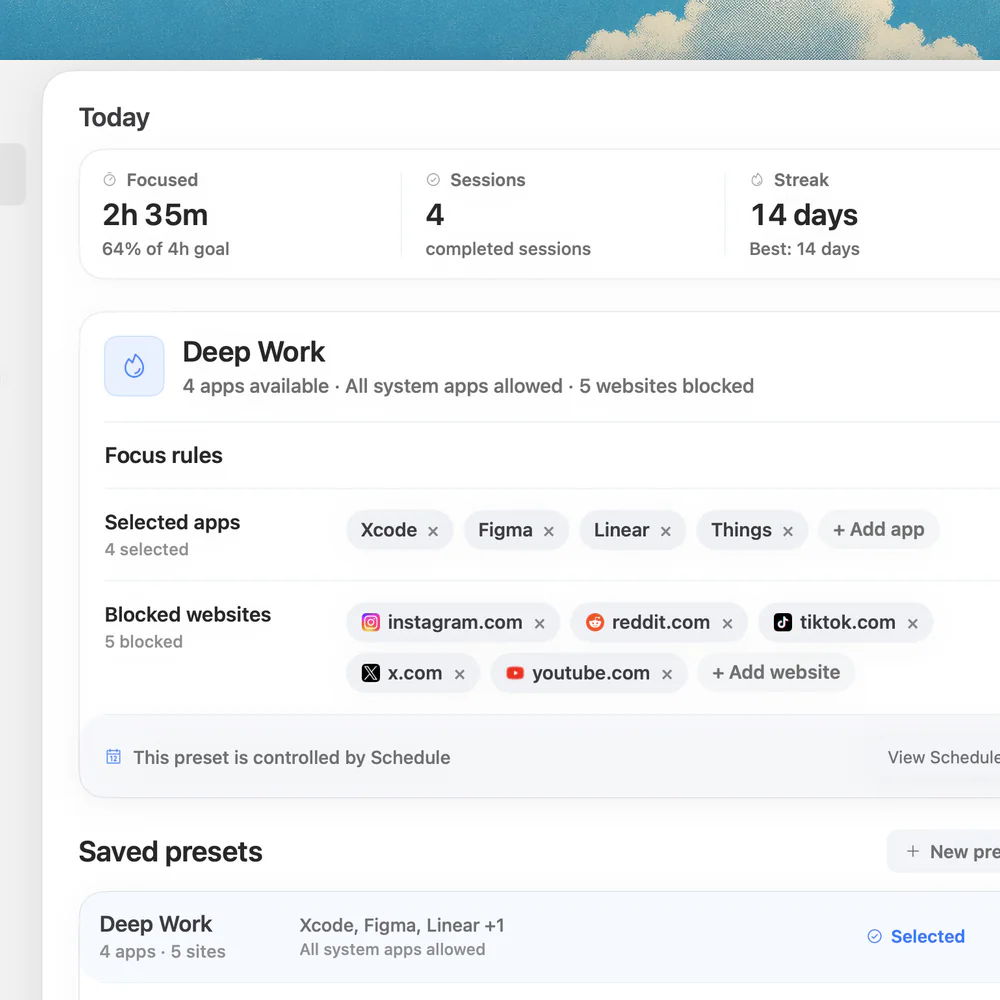
The best FocusMe alternative for a Mac depends on what you need to replace. Nudge suits selected app and website sessions, with a seven-day no-card trial and $9.99 one-time price. SelfControl is free for timed website blocks; Cold Turkey and Freedom offer different choices for stricter desktop rules or multiple devices.
How do these apps compare?
Choose a replacement for FocusMe and migrate rules without losing needed protection.
| App | Best for | Price | Website |
|---|---|---|---|
 NudgeTop pick | Mac focus sessions | $9.99 once | Get Nudge |
 SelfControl | Free timed website blocks | Free | Visit |
 Cold Turkey | Lockable desktop blocks | Free, Pro $45 once | Visit |
 Freedom | Connected device sessions | Free; Premium from $3.33/mo billed annually | Visit |
 FocusMe | Detailed plans across devices | $9.95/mo billed annually or $449 lifetime | Visit |
Which tool should you pick?
Mac sessions
Nudge
Presets for selected sites and apps; $9.99 once.
Free website timer
SelfControl
A Mac website block that lasts until its timer expires.
Strict desktop rules
Cold Turkey
Free timed website blocks; Pro adds apps and schedules.
Multiple devices
Freedom
Sessions can include a Mac and phone.
The apps in detail
- $9.99 once
1. Session blocker
Nudge
Best for: Mac focus sessions
- Choose it if
- You want selected sites and apps in a reusable Mac preset.
- Skip it if
- You need phone blocking or a hard-to-stop lock.
- Free
2. Mac website blocker
SelfControl
Best for: Free timed website blocks
- Choose it if
- You want a timer that continues until it expires.
- Skip it if
- You need app blocking or easy early reversal.
- Free, Pro $45 once
3. Desktop blocker
Cold Turkey
Best for: Lockable desktop blocks
- Choose it if
- You need timed website blocks or Pro app blocking and schedules.
- Skip it if
- You need phone support.
- Free; Premium from $3.33/mo billed annually
4. Cross-device blocker
Freedom
Best for: Connected device sessions
- Choose it if
- You want one session across a Mac and phone.
- Skip it if
- You need a native Linux desktop app or the same controls on every platform.
- $9.95/mo billed annually or $449 lifetime
5. Rules and limits
FocusMe
Best for: Detailed plans across devices
- Choose it if
- You want time limits, schedules and configurable protection.
- Skip it if
- You want a low-cost Mac-only purchase.
What are you replacing in FocusMe?
FocusMe combines several jobs: it can block websites and apps, schedule Focus Plans, apply time limits and use protection settings to make changes harder. A replacement need not copy every feature, but it must cover the ones that matter to you. List your actual devices and rules before comparing prices.
A student who starts one 45-minute block on a Mac may need a simple session. Someone who limits games every day across a laptop and phone has a different requirement. If a strict stop rule is essential, test that specific behavior before cancelling the old service.
Use FocusMe vs Freedom for that specific two-product decision. The Mac focus app hub is the broader shortlist; app blocker vs website blocker explains which layer your replacement needs.
| Need | Candidate | Tradeoff |
|---|---|---|
| Selected sites and apps on one Mac | Nudge | No phone blocking or equivalent hard lock |
| Free timed website block | SelfControl | Website-only; timer cannot easily be reversed |
| Desktop blocks and stronger controls | Cold Turkey | Apps, schedules and all locking features require Pro |
| Mac and phone in one session | Freedom | Schedules and Locked Mode require Premium |
| Detailed limits and Linux desktop | FocusMe | Subscription or higher lifetime price |
Nudge: a simpler Mac session
Choose Nudge if you mainly want to protect a particular task on your Mac. Select distracting apps and websites, save a preset and start a session from the menu bar. The browser itself can stay available for research while selected sites are blocked in Safari and Chrome. You can schedule a preset when your routine calls for it.
Nudge requires Apple silicon and macOS 13 or later. Its seven-day trial is free per Mac with no card; Lifetime Access is $9.99 once. It does not cover your phone, and you should not expect FocusMe’s detailed time-limit or enforced-plan system. Test the actual websites and applications you use during the trial.
SelfControl: a free commitment for websites
SelfControl is a free, open-source Mac app for timed website blocks. Add sites to its list, choose a duration and start the timer. The developer says the block continues until the timer expires, including after a restart or deleting the app. That can be appealing if early stopping is the reason you are looking for a replacement.
Its narrow scope is also the tradeoff: a website timer does not replace a plan that blocks desktop applications or coordinates a phone. Start with a short timer, save any needed reference pages, and review the domains carefully. A site needed for work will be unavailable for the remainder of the timer if it is included.
Cold Turkey: desktop blocking with a Pro upgrade
Cold Turkey Blocker Free includes website blocks, exceptions, timed blocks and statistics. Blocker Pro adds application blocking, scheduled blocks, an application password, all locking features, custom user selection, breaks and allowances. The vendor lists a seven-day Pro trial within the free app and says the paid license is a one-time purchase.
This is a candidate when desktop-specific rules and stronger locking matter more than mobile coverage. Cold Turkey supports macOS and Windows, not Linux, Android or iOS. Before using a strict lock, check the duration and ensure your work resources are available. The free tier and a Pro trial are different states, so verify which features remain after the trial.
Freedom: a session across devices
Freedom can sync a session across selected devices and lists Mac, Windows, iOS, Android and Chromebook. Its free account supports Start Now sessions up to two hours; recurring schedules, sessions started later, longer sessions and Locked Mode require Premium. Website exceptions are available on Mac and Windows.
Choose it when the distracting activity moves from your Mac to a phone and you want one coordinated session. Check each device’s specific controls: Freedom’s published comparison lists no app blocking on Chromebook, for example. Its free tier may be sufficient for a short manual session, but a recurring or locked rule changes the plan you need.
How to migrate a FocusMe plan safely
Start by writing down the rules you use: domains, apps, active days and times, daily limits, devices, and what happens when you try to stop. Mark rules that protect access to essential sites and those that must be difficult to change. Do not assume that exporting a list also transfers protection, schedules or mobile settings.
Create a short equivalent in the candidate app, preferably outside a critical meeting. Open a blocked site, a necessary work site, and the relevant desktop or phone app. Observe the behavior at the end of the session. Only remove your old recurring plans after the replacement has demonstrated the behavior you need.
Record your current sites, apps, devices and schedules.
Identify rules that need an allowance, a hard-to-stop session or an exception.
Build a short test in the candidate and check each browser and device.
Confirm the session ends or stops as expected and essential work still opens.
Disable the old recurring rule only after the replacement works, then review billing separately.
Example: replacing a weekday writing plan
Suppose your FocusMe plan blocks two social sites and a messaging app while you write on a Mac, but you never use its time limits or phone features. A Nudge preset with those same selections may cover the task. Test for 15 minutes, then try a normal work session. If an essential research site is caught, adjust the list before scheduling it.
Now suppose that plan also limits a game across Windows and Android and uses a strict commitment rule. A Mac-only session is not an equivalent replacement. Compare FocusMe, Freedom and Cold Turkey against each device and rule; a combination may be necessary. Check subscription cancellation and renewal dates separately from the technical migration.
Which rules are hardest to replace?
The tricky rules are usually the ones you cannot see in a simple blocklist. A daily allowance resets on its own schedule; a timed session ends after a duration; a recurring rule starts on particular days. If your old plan combines all three, write down each behavior independently instead of creating a single long block in the replacement.
Also record what happens to an exception. A work account and a personal account may use the same domain, and a service’s desktop app may behave differently from its website. Test the exact account, app and browser used for the real task. If the product cannot express the exception you need, keep that site available and choose another boundary for the session.
Finally, separate the technical change from the subscription change. Disabling an old plan does not necessarily cancel billing, and cancelling a subscription does not prove that every active rule has been removed. Review the vendor’s current instructions and your account status after the new setup works.
How much should you spend?
FocusMe’s website listed $17.95 monthly, $119.40 yearly and $449 lifetime on 1 November 2026. Freedom listed $8.99 monthly and $3.33 per month on a yearly plan; its $99.50 lifetime offer was a promotion at the time of checking. Prices, taxes and offers can change, so review the actual checkout.
Nudge’s $9.99 one-time price and SelfControl’s free download are attractive if their scope matches your use. A lower price is not a saving if you then need a second tool for phone restrictions or stronger enforcement. Write down the features you would otherwise lose and compare total cost for the period you expect to use them.
Before paying for stricter desktop rules, check Cold Turkey Free vs Pro. For a reversible first test, follow the temporary website-blocking setup.
FAQ
What is a free FocusMe alternative for Mac?
SelfControl is free and open source for timed website blocks. Cold Turkey Blocker Free also supports timed website blocks, while app blocking and schedules are Pro features.
Can Nudge replace FocusMe on my phone?
No. Nudge runs on Mac and does not apply its session to a phone. Consider a cross-device product when phone coverage is necessary.
Which alternative makes a block hard to stop?
SelfControl says its website timer continues until it expires, even after restart or deletion. Cold Turkey offers locking features; check the tier and chosen lock before starting.
Can I move my FocusMe rules automatically?
Do not assume schedules, exceptions or enforcement settings will transfer. Record each rule and recreate and test it in the new product.
Should I cancel FocusMe before testing a replacement?
Test the required rules first. Then turn off the old recurring plans and review subscription renewal or cancellation separately.
Nudge for Mac
Turn the guide into a focus session
Pick the apps and websites that pull you away and start the session from the menu bar. They stay blocked until it ends. $9.99 once after 7 days free, no card to start.
Download for macOS