How to block WhatsApp on a Mac (desktop app and WhatsApp Web, 2026)
How to block WhatsApp on a Mac: the desktop app and web.whatsapp.com. Screen Time, the hosts file and a focus app that blocks apps, with steps and limits.

Quick answer
To block WhatsApp on a Mac you have to cover two things: the WhatsApp desktop app and the WhatsApp Web site at web.whatsapp.com. For the app, set an App Limit in Apple Screen Time or use a focus app that blocks apps, such as Nudge. For the website, add web.whatsapp.com to the hosts file or to a Nudge preset. If you want WhatsApp closed only while you work, Nudge blocks the apps and websites you pick during a session, with websites blocked in Safari and Chrome.
How do these apps compare?
Block both the WhatsApp desktop app and WhatsApp Web on a Mac, and choose the method by what it actually covers.
| App | Best for | Price | Website |
|---|---|---|---|
 NudgeTop pick NudgeTop pick | Blocking the WhatsApp app and WhatsApp Web during work sessions | $9.99 once | Get Nudge |
 Apple Screen Time Apple Screen Time | A built-in cap on the WhatsApp app | Free, built into macOS | Visit |
 SelfControl SelfControl | A free website block that holds until a timer ends | Free | Visit |
 Cold Turkey Cold Turkey | Maximum friction | Free, Pro $45 once | Visit |
 Freedom Freedom | Blocking on Mac and phone together | $8.99/mo or $99.50 lifetime (Oct deal) | Visit |
Which tool should you pick?
Best for work sessions
Nudge
Blocks the WhatsApp app and web.whatsapp.com while a session runs, and lets them back in when you stop.
Built in and free
Apple Screen Time
An App Limit can cap the WhatsApp app with no extra software.
Free and strict
SelfControl
A free Mac blocker for websites that keeps its block on until the timer ends. It does not block apps.
Hardest to undo
Cold Turkey
Strict locked modes for apps and websites.
Across devices
Freedom
The same blocklists on Mac and phone.
The apps in detail
- $9.99 once
1. Website and app blocking
Nudge
Best for: Blocking the WhatsApp app and WhatsApp Web during work sessions
- Choose it if
- You want WhatsApp closed to you on the Mac while you work and reachable afterwards.
- Skip it if
- You also need blocking on your phone. Nudge is a Mac app. For the phone, look at Freedom, Opal or Session.
- Free, built into macOS
2. Usage limits
Apple Screen Time
Best for: A built-in cap on the WhatsApp app
- Choose it if
- You want a free limit from System Settings with no extra app.
- Skip it if
- You want the block tied to work sessions, or a block that holds the moment a session starts.
- Free
3. Website blocking
SelfControl
Best for: A free website block that holds until a timer ends
- Choose it if
- You only need web.whatsapp.com blocked and want it hard to bypass.
- Skip it if
- You need to block the WhatsApp app. SelfControl blocks websites, not apps.
- Free, Pro $45 once
4. Website and app blocking
Cold Turkey
Best for: Maximum friction
- Choose it if
- You need strict blocks on the WhatsApp app and website.
- Skip it if
- You want a gentle session workflow.
- $8.99/mo or $99.50 lifetime (Oct deal)
5. Website and app blocking
Freedom
Best for: Blocking on Mac and phone together
- Choose it if
- WhatsApp is a problem on both your Mac and your phone.
- Skip it if
- You want a Mac-local session tool only.
Do you need to block the WhatsApp app or WhatsApp Web?
Both, if you use both. WhatsApp offers a desktop app for Mac, downloadable from whatsapp.com/download/mac and also listed on the Apple App Store, and a web version at web.whatsapp.com that works in a browser. Blocking one does not block the other. Both are linked to the WhatsApp account on your phone, so the app and the browser tab can each be open at the same time.
A website block (hosts file, browser extension) stops the browser version. It may or may not stop the desktop app, because the app also talks to WhatsApp's servers directly, and WhatsApp does not publish the full list of hostnames the app uses. Do not rely on a hosts entry to block the app, and do not add guessed domains. Block the app as an app, block web.whatsapp.com as a website, then test both.
Which method should you use to block WhatsApp?
Use Screen Time App Limits for a free cap on the app, the hosts file for a quick block of WhatsApp Web, and Nudge when you want both the app and the website blocked for the length of a session. For the general app method, see how to block apps on a Mac.
| Method | Covers | Effort | Easy to undo? |
|---|---|---|---|
| Screen Time App Limit | The WhatsApp app (and the website if you add it) | Low | Easy: anyone with admin access can change it in System Settings |
| Hosts file | web.whatsapp.com in browsers that use the system resolver | Medium (Terminal) | Easy: delete the line and flush DNS |
| Browser-level options | One browser only | Low | Easy: switch to another browser or profile |
| Nudge focus session | The WhatsApp app and web.whatsapp.com in Safari and Chrome | Low | Blocks during sessions you start or schedule; you decide when it runs |
How do you block the WhatsApp app with Screen Time App Limits?
Screen Time can limit how long an app is used per day. On macOS 26 and earlier, App Limits set limits for specific apps, app categories and websites. On macOS 27, Apple's guide sets Time Allowances by app category, such as Social Media, so you may need to limit the whole category WhatsApp is in. A limit caps use; it does not remove the app.
- When the time is up, macOS shows a prompt that the person at the keyboard can usually dismiss with an extra allowance unless a Screen Time passcode is set. It limits time; it does not stop you opening WhatsApp at the start of a work session. For a block that starts when a session starts, use a focus app.
Click the Apple menu, open System Settings and click Screen Time in the sidebar (you may need to scroll). Turn it on if needed.
Open App Limits (on macOS 27, Time Allowances).
Add a limit and choose the WhatsApp app from the list of apps, or its category if you want a wider limit. On macOS 27, choose its category, such as Social Media.
Set a short daily time, then confirm.
Optional: turn on Lock Screen Time Settings so a passcode is needed to change it.
How do you block web.whatsapp.com with the hosts file?
Point web.whatsapp.com at an address that goes nowhere. Chrome reads the hosts file itself, and other browsers on this Mac that use the system resolver read it too. Safari follows it as well, unless iCloud Private Relay is on. Hosts entries do not support wildcards: each line covers one hostname only. WhatsApp Web is opened at web.whatsapp.com, so that is the hostname to list.
With iCloud Private Relay on, Safari sends its web requests through Apple's relays, so a hosts entry may not apply there; turn Private Relay off for Safari, then open the site to confirm it is blocked.
- To unblock, open the file again, delete the line and flush the cache again.
- It is a permanent block with no timer, and anyone who knows the trick can reverse it. If the desktop app still connects, that is expected; block the app with App Limits or a focus app.
Open Terminal and run:
sudo nano /etc/hostsEnter your Mac password. Move to the bottom of the file and add:
0.0.0.0 web.whatsapp.comPress Control-O, then Return to save, and Control-X to exit.
Flush the DNS cache so the change applies now:
sudo dscacheutil -flushcache
sudo killall -HUP mDNSResponder
Quit and reopen your browser, then open web.whatsapp.com and confirm it no longer loads. Quit and reopen the WhatsApp app and see whether it still connects.
Can Screen Time or your browser block web.whatsapp.com?
Screen Time has a web content restriction (System Settings, Screen Time, Content & Privacy, App Store, Media, Web & Games, Limit Adult Websites, Customize) where you add https://web.whatsapp.com to the Restricted list. It is aimed at Safari, so test other browsers.
Neither Safari nor Chrome has a built-in website blocklist for personal use. Chrome relies on extensions or system-level blocks. An extension affects only its own browser. Step-by-step options are in the Chrome guide and the Safari guide. For the general method, see how to block websites on a Mac.
Does blocking WhatsApp on the Mac stop messages on your phone?
No. WhatsApp runs on your phone as the main device, and the Mac app and WhatsApp Web are linked devices that you connect from WhatsApp on the phone. WhatsApp's help center says linked devices are logged out if the phone goes unused for more than 14 days. Blocking the Mac removes the Mac as a place to read and send messages. Messages still arrive on the phone.
To block WhatsApp on an iPhone, use Screen Time on the phone. A block on your Mac does not carry over, and Nudge is a Mac app only. Menu names differ slightly between iOS versions.
On the iPhone, open Settings and tap Screen Time.
Tap App Limits, add WhatsApp and set a time allowance.
Optional: tap Content & Privacy Restrictions, then App Store, Media, Web, & Games, then Web Content, then Limit Adult Websites, and under Never Allow add web.whatsapp.com.
How do you block WhatsApp only during work sessions?
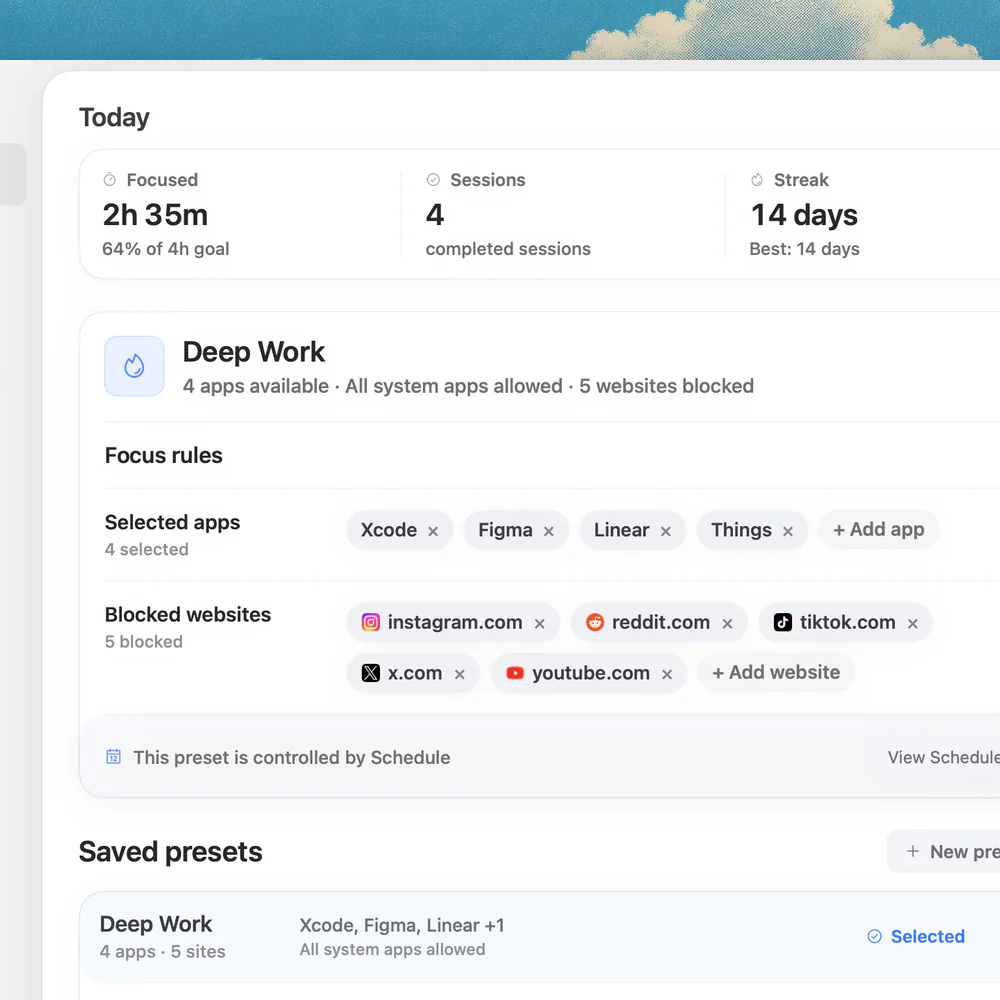
Use a focus app that blocks apps as well as websites, so WhatsApp is shut while you work and reachable after. Add the WhatsApp app and web.whatsapp.com to a Nudge preset and start the session from the menu bar. Nudge blocks the apps and websites you picked while the session runs, and websites are blocked in Safari and Chrome. Nudge does not block or silence notifications.
- WhatsApp is blocked on the Mac while you work and reachable after the session ends. Nudge costs $9.99 once for Lifetime Access, with no subscription, and every Mac gets a 7-day free trial that needs no email, password or card.
- To compare other tools, read the best website blocker apps for Mac and app blocker vs website blocker. The same approach works for chat apps such as Discord.
Open Nudge and create a preset, such as Deep Work.
Add the WhatsApp app to the apps to block, and web.whatsapp.com to the websites to block.
Start the preset from the menu bar, or use Quick Focus for a one-off session.
Optional: add a schedule so the preset runs on the days and hours you choose.
FAQ
How do I block the WhatsApp app on a Mac?
Set an App Limit for WhatsApp in System Settings, Screen Time, or add the WhatsApp app to a Nudge preset so it is blocked during sessions. A hosts file or browser extension blocks the website, and does not reliably stop the desktop app.
How do I block web.whatsapp.com on a Mac?
Add web.whatsapp.com to the hosts file in Terminal and flush the DNS cache, or add web.whatsapp.com to a Nudge preset, which blocks websites in Safari and Chrome during a session.
Does Screen Time block the WhatsApp desktop app?
It can limit it. An App Limit caps daily time in the app, and a passcode stops easy changes. It limits time; it does not switch the app off at the start of a work session. Labels vary between macOS versions.
Will blocking web.whatsapp.com in the hosts file stop the desktop app?
Do not count on it. The app and the website are separate, and WhatsApp does not publish every hostname the app uses. Block the app with App Limits or a focus app, and use the hosts file for the website.
Does blocking WhatsApp on my Mac block it on my iPhone?
No. A Mac block applies to that Mac. For the phone, use Screen Time on iPhone or another phone app such as Freedom, Opal or Session. Nudge is a Mac app and does not block phones.
Can Nudge block WhatsApp only during work hours?
Yes. Add the WhatsApp app and web.whatsapp.com to a preset and run it from the menu bar, or use a schedule to run the preset on the days and hours you choose.
Nudge for Mac
Turn the guide into a focus session
Pick the apps and websites that pull you away and start the session from the menu bar. They stay blocked until it ends. $9.99 once after 7 days free, no card to start.
Download for macOS