How to block Netflix on a Mac (2026)
Four ways to block Netflix on a Mac: Screen Time, the hosts file, browser settings, and Nudge focus sessions with a schedule, plus how to block it on iPhone too.

Quick answer
The fastest reliable way is a Nudge preset that blocks netflix.com in Safari and Chrome and runs on a schedule, so Netflix is off during work and back afterwards. For a free built-in option, use Screen Time. For a system-level block on this Mac, edit the hosts file. Netflix runs in the browser on a Mac, so the job is blocking netflix.com. Every method here can be undone by someone with enough access to your Mac.
How do these apps compare?
Block Netflix on a Mac with the method that fits how firm you need the block to be: Screen Time, the hosts file, browser settings or a focus app.
| App | Best for | Price | Website |
|---|---|---|---|
 NudgeTop pick NudgeTop pick | Blocking Netflix during work sessions | $9.99 once | Get Nudge |
 Apple Screen Time Apple Screen Time | A free built-in block | Free, built into macOS | Visit |
 SelfControl SelfControl | Free hard website blocks | Free | Visit |
 Cold Turkey Cold Turkey | Maximum friction | Free, Pro one-time | Visit |
 Freedom Freedom | Blocking on Mac and phone | $8.99/mo or $99.50 lifetime | Visit |
 BlockSite BlockSite | Browser-extension blocking | See pricing | Visit |
Which tool should you pick?
Best for work hours
Nudge
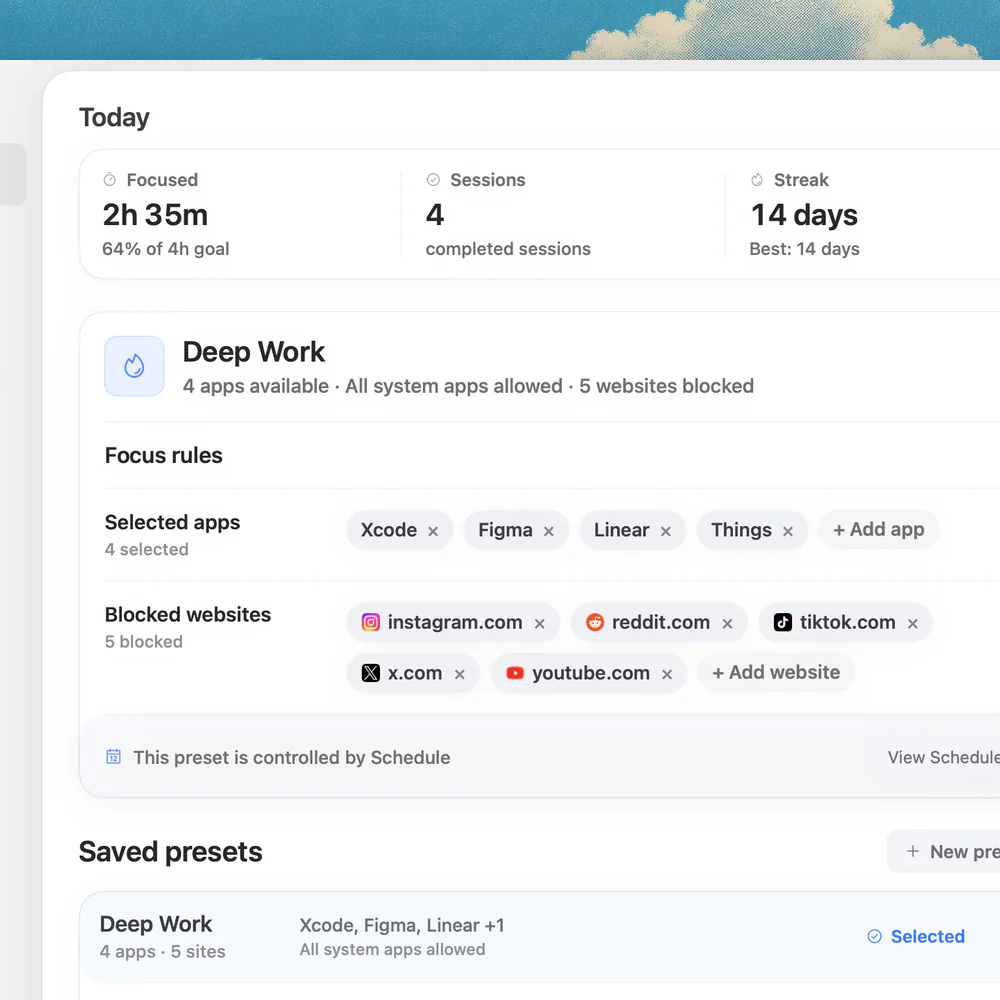
A preset and a schedule block Netflix in Safari and Chrome when you want to focus.
Best built-in option
Apple Screen Time
No install. Add netflix.com in the web content settings.
Free and strict
SelfControl
A free timed website block that keeps running until the timer ends.
Hardest to undo
Cold Turkey
Locked modes for people who need a block they cannot casually switch off.
Across devices
Freedom
The same blocklist on Mac and phone.
The apps in detail
- $9.99 once
1. Website and app blocking
Nudge
Best for: Blocking Netflix during work sessions
- Choose it if
- You want Netflix off at set times and back afterwards, with a preset and a schedule in Safari and Chrome.
- Skip it if
- You need to block on a phone. Nudge is a Mac app.
- Free, built into macOS
2. Usage limits
Apple Screen Time
Best for: A free built-in block
- Choose it if
- You want no extra install and can add netflix.com to the restricted list in System Settings.
- Skip it if
- You use Chrome. Apple labels the setting Safari, so check other browsers yourself.
- Free
3. Website blocking
SelfControl
Best for: Free hard website blocks
- Choose it if
- You want a free timed block of netflix.com that stays on until the timer ends.
- Skip it if
- You need app blocking, schedules or presets.
- Free, Pro one-time
4. Website and app blocking
Cold Turkey
Best for: Maximum friction
- Choose it if
- You want a locked block that is hard to switch off mid-session.
- Skip it if
- You want a gentle session workflow.
- $8.99/mo or $99.50 lifetime
5. Cross-device blocking
Freedom
Best for: Blocking on Mac and phone
- Choose it if
- You watch Netflix on both your Mac and your phone and want one blocklist.
- Skip it if
- You only need a Mac-local block.
6. Browser blocking
BlockSite
Best for: Browser-extension blocking
- Choose it if
- You want a lightweight block inside one browser.
- Skip it if
- You use several browsers or need system-level blocking.
How do the Netflix blocking methods compare?
Every method here can be undone by someone with enough access to your Mac. Pick the one that matches how firm you need the block to be.
| Method | Effort | Browsers | Easy to undo? |
|---|---|---|---|
| Screen Time web content | Low | Apple documents it for Safari; test it in other browsers | Easy if you know the Screen Time passcode or are the only admin |
| Hosts file | High (Terminal) | Chrome and other browsers on this Mac that use the system resolver. Safari too, unless iCloud Private Relay is on. | Easy: delete the two lines and flush DNS |
| Browser settings | Medium | One browser at a time | Easy: switch to another browser or profile |
| Nudge focus session | Low | Safari and Chrome | Blocks hold for the length of the session |
How do you block Netflix with Screen Time?
Screen Time is built into macOS and needs no install. It can restrict web content in System Settings: you add netflix.com to the list of restricted websites. Apple labels this setting Safari and does not describe it for other browsers, so open the site in each browser you use to confirm.
Click the Apple menu, choose System Settings, then click Screen Time in the sidebar (you may need to scroll).
Click Content & Privacy and turn it on if it is off.
Open App Store, Media, Web, & Games.
Under Safari, choose Limit Adult Websites, then click Customize.
Click the + button under the Restricted list and enter netflix.com. Add www.netflix.com the same way if you want both listed, then click Done.
Open netflix.com and www.netflix.com in Safari to confirm both are blocked. To remove a site later, select it in the Restricted list and click the minus button.
Does Screen Time stay on?
Screen Time can be turned off in the same settings. A Screen Time passcode is optional, but it makes the list harder to edit casually; check the label in Screen Time on your macOS. Menu names can differ slightly between macOS versions, so follow Apple's Screen Time guide if a label looks different.
How do you block Netflix with the hosts file?
The hosts file is a system-level block on this Mac, and it needs Terminal. It points a domain at your own Mac, so the real site never loads. It needs an admin password and applies to browsers on this Mac that use the system resolver or Chrome's own resolver, including Chrome's secure DNS setting.
Open the hosts file in Terminal and enter your Mac password.
sudo nano /etc/hostsAdd these lines at the bottom, then press Control-O, Return and Control-X to save and exit.
127.0.0.1 netflix.com
127.0.0.1 www.netflix.com
Entries match one hostname each, with no wildcards, so list every subdomain you use. Flush the DNS cache, then quit and reopen your browser so open connections and caches do not keep the site loading.
sudo dscacheutil -flushcache
sudo killall -HUP mDNSResponder
How do you unblock Netflix after editing the hosts file, and what does it not cover?
To unblock Netflix, open the file again, delete the two lines, and flush DNS again. That is also why this method is easy to undo: it takes one minute and your admin password.
With iCloud Private Relay on, Safari sends its web requests through Apple's relays, so a hosts entry may not apply there; turn Private Relay off for Safari, then open the site to confirm it is blocked. A proxy or VPN that resolves names remotely does not read this Mac's hosts file either.
Can you block Netflix in the browser itself?
Partly. Browser settings are the weakest option. Safari and Chrome do not have a built-in "block this site" switch. You can use an extension that blocks sites, or create a separate browser profile for work that never signs in to anything you use for streaming. Both are easy to bypass by opening another browser or profile.
See the Safari guide and the Chrome guide for the details.
How do you block Netflix on an iPhone too?
Use Screen Time on the iPhone. Nudge is a Mac app and does not block on phones.
Open Settings, then Screen Time.
Tap App Limits and set a limit for Netflix, or use Downtime for set hours.
Tap Content & Privacy Restrictions and turn it on, then tap App Store, Media, Web, & Games, then Web Content.
Choose Limit Adult Websites, tap Add Website under Never Allow, and enter netflix.com.
How do you block Netflix during work sessions with Nudge?
Use this when you want Netflix off at set times and back afterwards. Nudge is a Mac app (macOS 13+) that blocks the apps and websites you pick during a focus session. Websites are blocked in Safari and Chrome. If you have a Netflix app installed, add it to the blocked apps too.
Open Nudge and create a preset, such as Work.
Add netflix.com to the blocked websites, and any Netflix app to the blocked apps.
Start the preset from the menu bar, or use Quick Focus for a one-off session.
Optional: add a schedule so the preset runs on chosen days and hours without you starting it.
What does Nudge cost, and is there a timer without blocking?
Nudge costs $9.99 once for Lifetime Access, with no subscription. Every Mac gets a 7-day free trial, with no email, password or card to start. For other options, see the best website blocker apps for Mac, or the general guide to block websites on Mac.
Short work blocks can be enough on their own. The free Pomodoro timer runs in any browser, with no sign-up.
FAQ
Is there a Netflix app to block on a Mac?
Most people watch Netflix on a Mac in a browser, so blocking netflix.com is what matters. If you have any Netflix app installed, add it to the apps Nudge blocks as well.
Does blocking netflix.com in the hosts file work in every browser?
It applies to browsers on this Mac that use the system resolver or Chrome's own resolver, which includes Chrome, and Safari with iCloud Private Relay off. With Private Relay on, Safari sends its web requests through Apple's relays, so a hosts entry may not apply there. A proxy or VPN that resolves names remotely does not read this Mac's hosts file either. Open the site to confirm it is blocked. The hosts file does nothing for other devices, and anyone with administrator access can remove the lines in a minute.
Can I block Netflix only during work hours?
Yes. Create a Nudge preset that blocks netflix.com, then add a schedule that runs the preset on the days and hours you choose. Outside those hours Netflix works as usual.
Does Screen Time block Netflix in Chrome?
Apple's Mac instructions describe the web content setting for Safari. Check Chrome yourself after you set it up, and use the hosts file or Nudge if you need Chrome covered.
How do I block Netflix on an iPhone as well?
Use Screen Time on the iPhone: set a Downtime or App Limit for the Netflix app, and turn on Content & Privacy Restrictions, then go to App Store, Media, Web, & Games, Web Content, Limit Adult Websites, and under Never Allow tap Add Website and enter netflix.com. Nudge is a Mac app and does not block on phones.
Does Nudge cost anything to try?
Every Mac gets a 7-day free trial with no email, password or card to start. After that, Nudge is $9.99 once for Lifetime Access, with no subscription.
Nudge for Mac
Turn the guide into a focus session
Pick the apps and websites that pull you away and start the session from the menu bar. They stay blocked until it ends. $9.99 once after 7 days free, no card to start.
Download for macOS